 DeskPulse
The best crypto price widgets for Windows 11 in 2026
Windows 11 does not ship with a proper crypto ticker, so people end up with a browser tab that is always one Alt+Tab away. Here are the realistic ways to put live prices on your desktop, what each one is good at, and where it falls short.
What a good crypto widget actually needs
Before comparing tools, it helps to agree on the checklist. After building and using one for a while, these are the things that decide whether a widget stays installed or gets removed a week later:
- Any coin, not a fixed list. The top ten is not enough if you hold a mid-cap or a new listing.
- Price alerts on the desktop. A widget you have to look at is a screensaver. Notifications are what turn it into a tool.
- Stays out of the way. Always on top when you want it, tray or click-through when you do not.
- No wallet, no keys, no account. A price viewer has no business asking for any of them.
- Light on the machine. It runs all day; it should not fight your browser or your game for CPU.
- Readable source. For anything you keep open next to crypto, auditability matters.
1. DeskPulse — free, open-source desktop widget
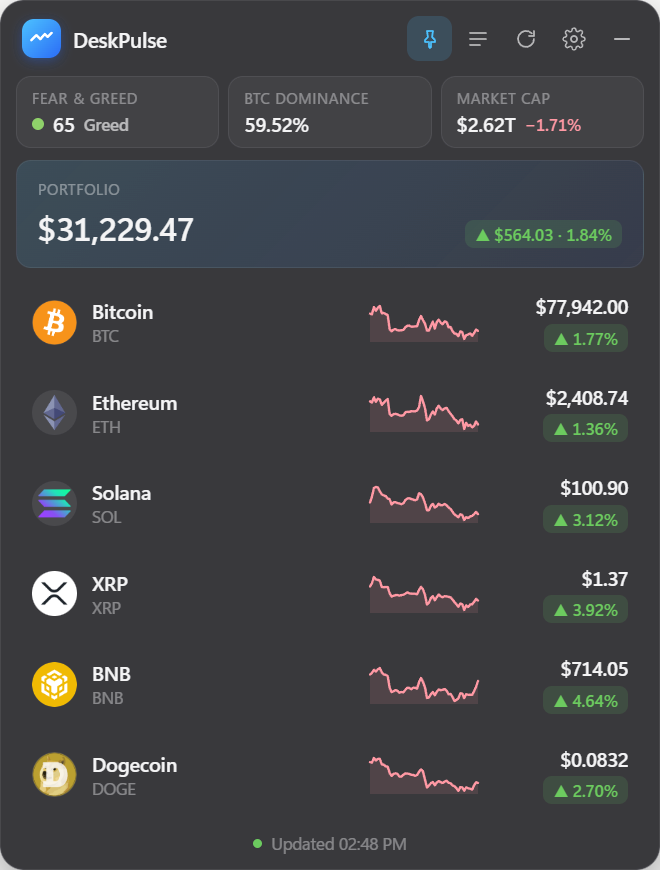
DeskPulse is a standalone Windows app that lives as a transparent panel on your desktop. It tracks any of the 15,000+ assets on CoinGecko, draws a 7‑day sparkline per coin, shows the Fear & Greed index and BTC dominance, and fires native Windows notifications when a price crosses a level you set. You can enter your holdings to see a portfolio total; the amounts never leave your PC.
It has a compact 300‑pixel mode, a click-through “ghost” mode for sitting over charts, a global show/hide hotkey and light/dark themes that follow Windows. The code is MIT-licensed on GitHub and the app never asks for a wallet or exchange key.
Best for: anyone who wants alerts and a portfolio total without giving an app their keys. Weak spot: Windows only, and the free CoinGecko feed refreshes about once a minute, so it is not a tick-by-tick trading terminal.
2. Rainmeter skins
Rainmeter is the classic Windows desktop customisation engine, and there are community skins that pull crypto prices. If you already run Rainmeter for a clock or system monitor, adding a price skin is natural and the visual freedom is unmatched.
Best for: people who enjoy tweaking their desktop. Weak spot: skins are maintained by individuals and often break when an API changes; alerts and portfolio features are rare, and you are trusting whichever skin author’s code you download.
3. Browser extensions
Extensions from price sites put a ticker in your browser toolbar. They are quick to install and update with the site.
Best for: people who live in the browser anyway. Weak spot: they only exist while the browser is open, they run inside the same process as your web wallets, and extension permissions are exactly the kind of thing crypto users should be wary of.
4. The Windows 11 Widgets board
The Widgets panel (Win+W) can show a finance watchlist that includes some cryptocurrencies. It costs nothing and is built in.
Best for: a quick glance at BTC and ETH. Weak spot: it is a pop-over, not a persistent desktop element, coin coverage is limited to what the feed offers, and there are no alerts.
5. Exchange desktop apps
Most exchanges have desktop terminals with excellent real-time data. They are the right tool if you actively trade there.
Best for: active traders. Weak spot: you need an account and a login, they are full-screen applications rather than widgets, and they only show that exchange’s markets.
Side by side
| DeskPulse | Rainmeter skin | Browser extension | Widgets board | |
|---|---|---|---|---|
| Any coin | 15,000+ | Depends on skin | Usually yes | Limited |
| Desktop alerts | Yes | Rare | Browser only | No |
| Portfolio total | Yes, local | Rare | Cloud account | No |
| Always on top / click-through | Yes / yes | Yes / yes | No | No |
| Needs account or keys | No | No | Sometimes | Microsoft account |
| Open source | Yes | Varies | Rarely | No |
Our pick
If you want a widget that does its job and asks for nothing, DeskPulse is the most complete free option: alerts, portfolio, any coin and readable source. Rainmeter is the choice for aesthetics, and an exchange terminal is the choice if you actually trade all day.
Related: three ways to add a crypto ticker to your Windows 11 desktop and how to get Bitcoin price alerts on Windows.