 DeskPulse
How to add a crypto ticker to your Windows 11 desktop
You want the price on the desktop, not in a tab. These are the three approaches that actually work on Windows 11, from the two-minute option to the fully customised one.
Option 1: A dedicated crypto widget (fastest)
A purpose-built widget gives you a persistent panel, alerts and any coin without configuration files. DeskPulse is free and open source:
- Download and run the installer (about 80 MB).
- Drag the widget where you want it. It remembers the position, even across monitors.
- Click the pin icon to keep it on top, or the compact icon for a narrow ticker strip.
- Add coins in Settings → Coins; search by name or ticker.
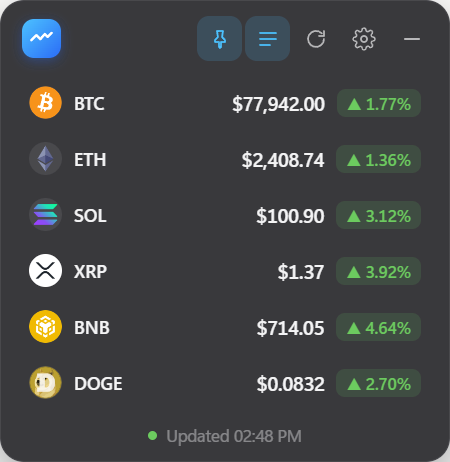
Turn on ghost mode if you want the ticker over a chart or a game: clicks pass straight through it to the window below. Press Ctrl+Shift+D to show or hide it from anywhere.
Option 2: The Windows 11 Widgets board
Windows 11 has a built-in Widgets panel. Open it with Win+W, add the finance/watchlist widget and search for the assets it supports. It is free and needs no install.
The catch is that it is a pop-over, not a desktop element: it disappears when you click elsewhere, coin coverage is limited to the feed Microsoft uses, and there are no price alerts.
Option 3: Rainmeter
Rainmeter is a desktop customisation engine with a large library of community skins, including several for crypto prices. Install Rainmeter, download a crypto skin, load it and edit the skin’s settings file to choose coins.
This gives total visual control, but skins are maintained by volunteers and can stop working when the price API they call changes. Alerts and portfolio features are uncommon.
Which one should you pick?
| Dedicated widget | Widgets board | Rainmeter | |
|---|---|---|---|
| Setup time | 2 minutes | 1 minute | 15–30 minutes |
| Stays on desktop | Yes | No (pop-over) | Yes |
| Alerts | Yes | No | Rare |
| Any coin | Yes | Limited | Depends on skin |
| Customisation | Themes, layouts | None | Unlimited |
For most people the dedicated widget is the right answer; Rainmeter is for enthusiasts; the Widgets board is fine for a quick BTC check.
Related: the best crypto price widgets for Windows 11 and setting up desktop price alerts.